


PrinterShare Mobile Print
4.123.62K Reviews
App Specs
- Version
- 12.25.0
- Updated On
- License
- Free
- Downloads
- 10,000,000+
- Developer
- Mobile Dynamix
- Categories
- Business
- Platform
- Android, iOS
Screenshots
 Analysis by AppCompare
Ever found yourself in a pinch, needing to print something super important, but your computer is nowhere to be found? Yeah, me too. That's when PrinterShare Mobile Print swoops in like a superhero. This nifty app has been a lifesaver for many of us who need to print directly from our phones without the hassle of transferring files. Let's dive into what makes this app a keeper.
Setting Up PrinterShare Mobile Print
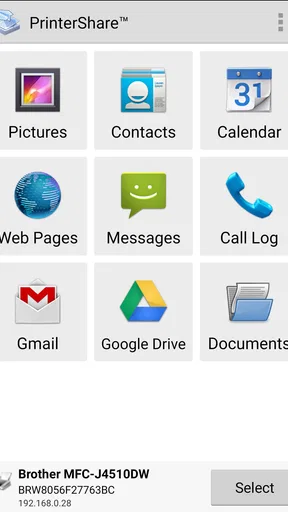
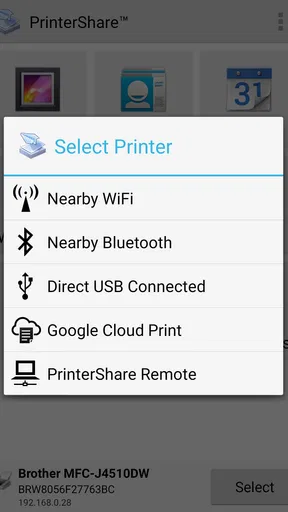
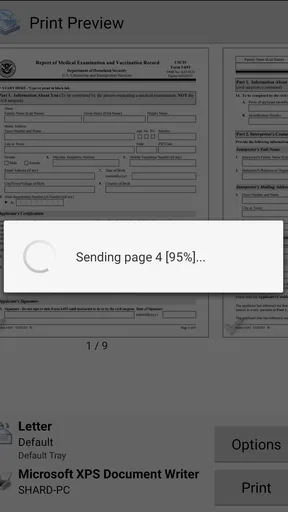
Alright, first things first. Getting PrinterShare Mobile Print up and running is as smooth as it gets. I mean, you don't need a degree in rocket science to figure it out. Once you've downloaded the app from the Play Store or the App Store, it’s a straightforward setup process. It detects any nearby printers, be it via Wi-Fi, Bluetooth, or even USB. Yes, you heard it right — USB! Just make sure your phone supports USB OTG, and you're golden.
After the initial setup, the app will prompt you to download a small driver for your specific printer model. This is super helpful because it means you can print with precision without any weird formatting issues. And if you're using a Wi-Fi printer, it gets even better. You can just select the printer from the list and start printing, no wires needed.
A User-Friendly Interface
The interface? Oh boy, it's as intuitive as it gets. The layout is clean, which makes navigation a breeze. All the essential functions are right at your fingertips. Whether you're printing a document, a photo, or even a webpage, it’s just a couple of taps away.
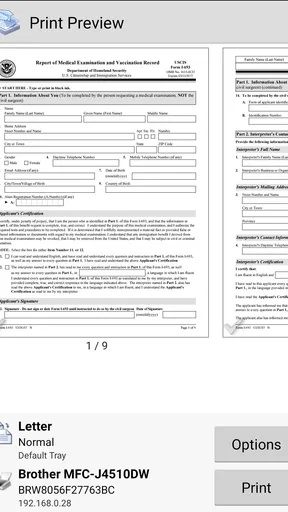
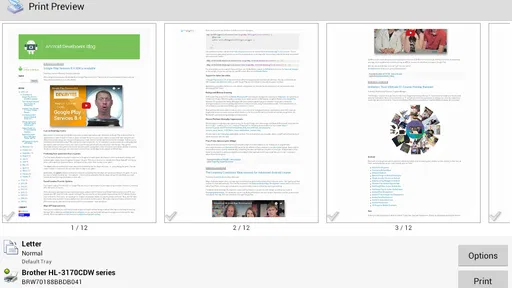
What I particularly love is the preview feature. Before hitting that print button, you get a detailed preview of what’s about to come out of the printer. This includes any cropping or scaling adjustments that might be needed. Trust me, it saves a lot of paper and ink!
Print Options Galore
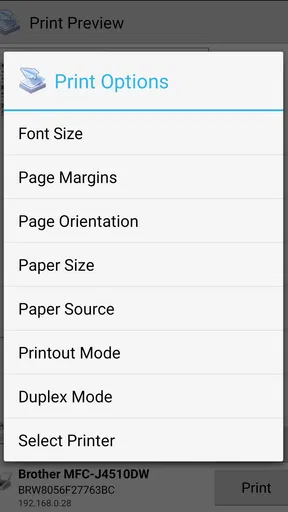
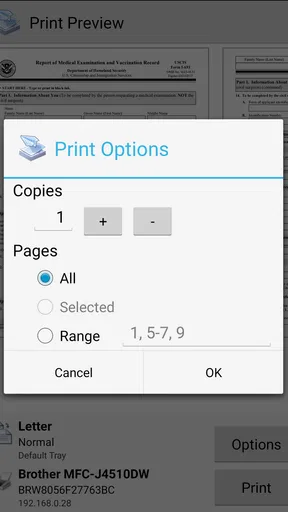
Alright, let's talk options. PrinterShare Mobile Print offers a variety of print settings, allowing you to customize your print job like a pro. Need double-sided printing? Check. Want to adjust the print quality or paper size? Done and done. You can even choose the number of copies, color or grayscale, and paper orientation. It’s like having a mini print shop in your pocket.
If you're someone who prints a lot of photos, you'll appreciate the photo print quality. I tested it with a few high-res images, and I was pleasantly surprised by the vibrant colors and sharp details. It’s not just for documents; it handles photos beautifully as well.
Worth Reading Before You Choose

Flipboard Shows What News Apps Must Do Beyond the Feed

Switching to Android Auto Means Rethinking Your Driving Routine

Google Calendar Makes a Crowded Week Easier to Manage

Ludo King Makes the Most of the Minutes Between Plans

Baby Panda World Brings Quick Play to Modern Phones, but Its Game Library Feels Busy

ESPN’s Live Game View Makes Following Close Games Easier
Cloud Printing and Remote Printing
Here's where it gets interesting. The app supports cloud printing from services like Google Drive, Dropbox, and OneDrive. This means you can print documents stored in the cloud without downloading them to your phone. It's super convenient, especially if you’re on the move and need to print something stored online.
And then there's remote printing. Yes, you can print to a compatible printer from anywhere in the world. I tried printing a document to my home printer while I was at a café, and it worked like a charm. Just make sure your printer is online and connected to the app.
Subscription and Costs
Now, let’s talk about the money part. PrinterShare Mobile Print is free to download and use for basic functions. However, to unlock all features, you'll need the premium version. It’s a one-time purchase, and honestly, if you print regularly, it’s a solid investment. The premium version removes ads and unlocks features like unlimited remote printing, which is a game-changer.
If you’re on a tight budget, the basic version still offers plenty of features to keep you satisfied. But for those who need the full suite, the premium version is worth every penny.
The Verdict
In a world where convenience is king, PrinterShare Mobile Print stands out as an essential app for anyone who needs to print on the go. Whether you’re printing documents for work, photos for a scrapbook, or anything in between, this app has got your back.
The setup is easy, the interface is user-friendly, and the print quality is impressive. Plus, with the ability to print from the cloud and remotely, it’s versatile enough to meet all your printing needs. So next time you’re in a bind and need to print something ASAP, give PrinterShare Mobile Print a try. You won’t be disappointed!
Pros
- Easy to connect with wireless printers.
- Supports a wide range of file formats.
- Allows remote printing via internet.
- User-friendly interface for quick setup.
- Offers cloud service integration.
Cons
- Limited free version features.
- Some printers require additional setup.
- May consume high data for remote printing.
- Occasional connectivity issues reported.
- Subscription required for full features.
FAQs for PrinterShare Mobile Print
How does PrinterShare Mobile Print work?
PrinterShare Mobile Print allows users to print documents, photos, emails, and web pages directly from their Android or iOS devices. It supports a wide range of printer models and enables printing via Wi-Fi, Bluetooth, or USB connections. The app detects compatible printers on the network and facilitates seamless printing without needing a computer.
Is PrinterShare Mobile Print compatible with all printers?
PrinterShare Mobile Print supports a vast array of printer models from leading brands like HP, Canon, Epson, and Brother. However, compatibility may vary based on the specific model and its connectivity options. It's recommended to check the app's supported printer list or test with the free version before purchasing to ensure compatibility.
What types of documents can I print using PrinterShare Mobile Print?
The app supports printing a variety of document types, including PDF files, Word documents, Excel spreadsheets, PowerPoint presentations, and images. It also allows printing directly from email attachments and cloud storage services. This makes it versatile for both personal and professional use, covering most common file formats.
Does PrinterShare Mobile Print require an internet connection?
An internet connection is not always necessary for PrinterShare Mobile Print. If you are printing over a local Wi-Fi network or using a Bluetooth or USB connection, you can print without internet access. However, for cloud printing or accessing files from internet-based services, an active internet connection is required.
Is there a cost associated with using PrinterShare Mobile Print?
PrinterShare Mobile Print offers a free version with limited features to test basic functionality. To access the full range of features and remove printing restrictions, a premium key is required. This one-time purchase unlocks unlimited printing capabilities, providing a more comprehensive and ad-free experience.


